
Xiaomi Scanner
Screenshots
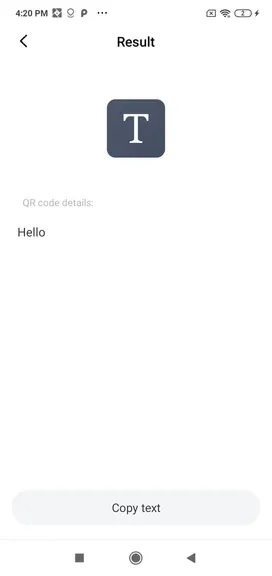
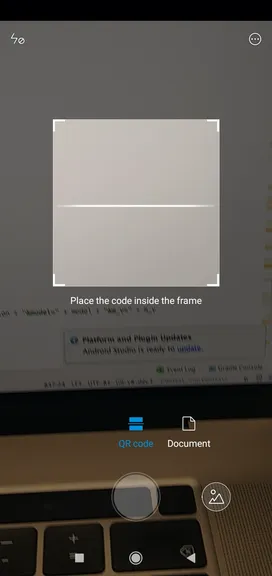
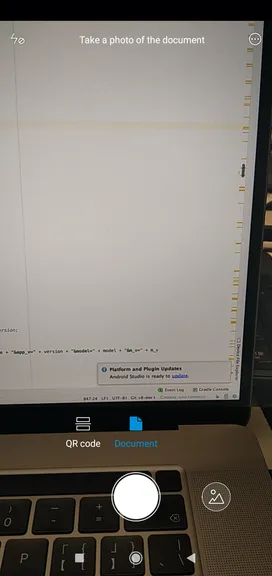
Xiaomi Scanner is an official utility designed to streamline document scanning, QR code reading, and text extraction. Consequently, users can convert physical paperwork into clean digital files in just a few seconds. In addition, this application eliminates the need for bulky hardware scanners in daily office routines.
Furthermore, the responsive interface ensures smooth navigation for users of all technical skill levels. As a result, managing important files, contracts, and receipts becomes remarkably simple and fast. Above all, the tool keeps your personal document management efficient, fast, and highly organized.
Xiaomi Scanner: Streamlining Document Workflows for Daily Efficiency
Mobile productivity relies heavily on rapid document capture and clean high-resolution image rendering. Therefore, having an integrated scanning tool on your mobile device saves valuable working time. You can capture physical receipts, book pages, and business cards without extra desktop equipment.
In addition, automatic image processing corrects dark lighting and removes unwanted background clutter. So, every scan looks sharp, crisp, and ready for immediate professional email sharing. Likewise, users can organize their scanned files neatly inside dedicated local storage directories.
Key Features of Xiaomi Scanner App For Android
Xiaomi Scanner includes many practical built-in functions designed to improve daily document management. Most importantly, these tools simplify everyday tasks like extracting printed text and reading codes.
Instant QR Code and Barcode Scanning
Firstly, the application detects standard QR codes and barcodes within a fraction of a second. You simply point the camera at the code to display the encoded link instantly.
For instance, opening website links or connecting to local networks takes minimal effort. As a result, reading product barcodes during shopping trips becomes fast and reliable.
Optical Character Recognition
Secondly, built-in optical character recognition extracts editable text directly from scanned images. That is to say, you can convert printed notes into copyable text without manual typing.
Consequently, copying long paragraphs from physical books takes only a single tap. In addition, you can save the extracted text directly into your favorite notes application.
Automatic Edge Detection and Cropping
Further, smart algorithms detect paper boundaries automatically during the camera scanning process. The tool crops unnecessary background space and aligns skewed paper lines accurately.
Therefore, your final document layout looks professional and cleanly aligned every time. Likewise, this automated framing removes the hassle of manual image cropping.
Live Text Translation
Furthermore, integrated translation tools help users read printed foreign text instantly. To clarify, the camera captures foreign words and translates them directly on screen.
As a result, reading international documents or street signs becomes effortless during travel. So, users can overcome language barriers quickly without installing additional dictionary tools.
Searchable Scan History Archive
Meanwhile, the application records every previous scan inside an organized history menu. You can access past web links or document scans whenever you need them again.
So, losing crucial information from earlier scans is never a concern. In addition, you can filter through your past history list with simple keyword searches.
Smart Document Enhancement Filters
Above all, special filters sharpen dark text and clean up uneven shadows on paper. For example, you can convert color photos into clean black-and-white PDF files.
Thus, reading scanned documents remains comfortable on any display screen. Moreover, these visual adjustments significantly increase the legibility of faded paper text.
Custom Document Watermarking
Additionally, users can apply custom text watermarks across scanned pages for added document security. For instance, adding confidential labels protects business contracts before sending them electronically.
Therefore, your sensitive information remains secure during public file distribution. As a result, managing private business paperwork becomes safer and more professional.
Quick Contact Information Extraction
Likewise, scanning business cards allows you to extract phone numbers and email addresses instantly. That is to say, the tool formats contact details into clean digital address records automatically.
Consequently, saving new professional contacts to your phone directory takes minimal effort. In short, business networking becomes much faster with instant card digitization.
Together, these individual features form a complete utility suite for daily file scanning. Consequently, users can handle diverse personal and office documentation tasks using one single application.
Xiaomi Scanner: Maximizing Productivity with Digital Document Management
Digital document storage helps eliminate physical paper clutter in modern offices and home workspaces. However, manual file digitization often feels tedious without proper camera optimization tools. Fortunately, smart processing functions streamline image capture and document preparation significantly.
Moreover, converting physical contracts into digital files accelerates everyday communication and file sharing. Therefore, sending signed forms via email requires only a few rapid actions on your device. In short, digital scanning workflows save precious time while improving overall document organization.
How to Download and Install Xiaomi Scanner APK
Installing the application setup package on your device requires only a few straightforward steps. Click the download button on this page to store the setup file safely in your storage folder. After that, follow the simple installation guide listed below to complete the setup process smoothly.
- Download the Setup File: Tap the direct download button to save the current APK package to your device storage. Make sure your storage has sufficient free space for downloading the file.
- Enable External Installation: Navigate to system settings and grant permission to install applications from external sources. Consequently, this setting allows package installation from downloaded file folders.
- Locate the Package: Open your file manager application and browse directly to your primary downloads folder. Look for the newly saved setup file at the top of your recent download list.
- Initiate the Setup: Tap on the downloaded APK file to open the system package installer prompt. Review the required permission requests on screen before proceeding with the installation.
- Confirm and Install: Select the install option and wait a few moments for the setup to finish completely. As a result, the system installs all required core components automatically.
- Launch the Utility: Tap the application icon on your home screen to start scanning documents right away. You can now adjust your scanning preferences and start digitizing paper files.
Xiaomi Scanner App Tips and Tricks
- Optimize Surface Lighting: Place physical paper under bright, direct light before capturing the image with your camera. Consequently, avoiding harsh shadows ensures clearer text extraction results.
- Use High Contrast Backgrounds: Position dark documents on light surfaces or white sheets on dark tables for quick border detection. As a result, the automatic edge detection algorithm crops borders with high precision.
- Clean the Camera Lens: Wipe your camera lens with a soft microfiber cloth before starting a new scanning session. So, removing smudges prevents blurry text and improves overall scan clarity.
- Apply Monochrome Filters: Select black-and-white filter presets when scanning printed text pages or written forms. In addition, this reduces final file sizes and improves printed text contrast.
- Batch Scan Multiple Pages: Scan consecutive document pages in one session before saving everything into a single file. Therefore, you create neatly organized multi-page digital files without extra effort.
- Manage Cache Data: Open app settings periodically and remove outdated link scans or temporary image files. In short, clearing cached data maintains fast app performance on your device.
Final Verdict on Xiaomi Scanner App
In conclusion, Xiaomi Scanner offers a practical, highly efficient tool for all your document scanning requirements. Its fast processing speeds, accurate text recognition, and clean layout make file creation simple. Above all, users can replace bulky office hardware with this flexible mobile camera solution.
To sum up, whether you need to read QR codes or convert contracts, this tool performs reliably. In addition, the straightforward control design allows immediate ease of use without technical confusion. Therefore, downloading this utility will greatly elevate your daily productivity and file management routine.